




This package is built on top of PHP JSON tongue to bring localization feature to tightenco/jigsaw using JSON files.
- PHP 8.0 or higher.
Install the package using composer:
composer require elaborate-code/jigsaw-localization
Plug LoadLocalization to the builder by registering it in bootstrap.php:
<?php

// bootstrap.php

use ElaborateCode\JigsawLocalization\LoadLocalization;

$events->beforeBuild([LoadLocalization::class]);- Create a
langfolder in the root of your project. - Create subfolders for each language/locale.
- Populate the subfolders with JSON files that hold translations using the
original textas akey, and thetranslationas avalue.
File structure example:
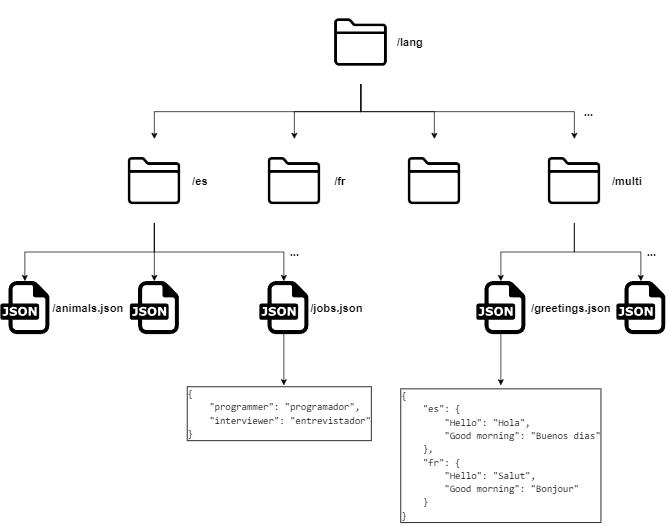
Source example:
<h2> {{ __($page, "Good morning", 'en') }} </h2>

<h2> {{ __($page, "programmer", 'es') }} </h2>

<h2> {{ __($page, "Good morning", 'fr') }} </h2>
The output:
<h2> Good morning </h2>

<h2> programador </h2>

<h2> Bonjour </h2>two or three lowercase letters for the language code + optionally a dash (-) with two uppercase letters for the region code. For example, all the following codes ar, es, fr-CA, haw-US are considered valid.
For organizational purpose you can group internationalized translations in one JSON using many locale keys.
/lang
    ...
    /multi
        greetings.json
        projects_short_descriptions.json
        ...
greetings.json example:
{
    "fr": {
        "Hello": "Salut",
        "Goodbye": "Au revoir"
    },
    "es": {
        "Hello": "Hola",
        "Goodbye": "Adiós"
    }
}
First level keys must be locale codes!
First you need to define defaultLocale in config.php. If not set, the package will take en as a default.
<?php

// config.php

return [
    // ...
    'defaultLocale' => 'es',
    // ...
];If you call the __ helper without providing a locale parameter, it will try to resolve it from the page path.
echo __($page, $text);If you provide the
__helper with thelocaleparameter it will proceed with it and ignore the folder structure.
domain.com/{locale}/path
Pages that reside in the web root folder source are assumed to be rendered using the defaultLocale. Other pages that reside in subfolders named after a locale code have their locale set to the subfolder name
/source
    /fr
        index.blade.php
        contact.blade.php
        about.blade.php
        ...
    /es
        index.blade.php
        contact.blade.php
        about.blade.php
        ...
    ...
    index.blade.php
    contact.blade.php
    about.blade.php
    ...
You may find your self creating a fully coded source/index.blade.php and repeating the same code in source/fr/index.blade.php and for other locales. To avoid that we suggest the following approach:
- Create a
source/_pagesdirectory which will contain the master pages. - A master page will look like any other ordinary page, it will have the HTML structure and calls to
__but no hardcoded$current_localevalue .For example You may directly copy the content ofsource/index.blade.phptosource/_pages/index.blade.php. - Include the master page into other pages that are locale aware.
- The included content will be able to know which locale to apply on the translation helper
__calls as a$current_locale.
/source
    /_pages
        index.blade.php
        contact.blade.php
        ...
    /fr
        index.blade.php
        contact.blade.php
        ...
    index.blade.php
    contact.blade.php
    ...
// Both /source/index.blade.php and /source/fr/index.blade.php
@include('_pages.index')IMPORTANT: All the following helpers will try to resolve the locale code from the path if needed!
Setting
baseUrlin the config is essential if your site root URL isn't 'domain.com/index.html'
Returns the current page locale deduced from its path.
current_path_locale($page) // ar | es | fr-CA | haw-USUsage example:
<!DOCTYPE html>
<html lang="{{ current_path_locale($page) }}">
    <head>
<!-- ... -->When you have a page that is available in many locales. translate_path helps you get the equivalent translated path.
translate_path($page, $target_locale)input/output examples:
| current path | translated path | current_locale to target_locale |
|---|---|---|
| "/" | "/fr" | default -> fr |
| "/contact" | "/fr/contact" | default -> fr |
| "/fr" | "/" | fr -> default |
| "/fr/contact" | "/contact" | fr -> default |
| "/es/contact" | "/fr-CA/contact" | es -> fr-CA |
| "/es" | "/fr-CA" | es -> fr-CA |
Usage example:
<nav>
    @foreach(['en', 'es', 'fr'] as $locale)
        <a href="{{ translate_path($page, $locale) }}"> {{ $locale }} </a>
    @endforeach
</nav>Just like the translate_path helper, but it prepends the baseUrl if set in the config.
translate_url($page, $target_locale)To avoid hard coding the current_locale into paths, input only the partial path that comes after the locale code part into this helper and it will handle the rest for you.
locale_path($page, $partial_path)| $partial_path | current_locale | href |
|---|---|---|
| "/" | DEFAULT | "/" |
| "/" | "fr" | "/fr" |
| "/contact" | DEFAULT | "/contact" |
| "/contact" | "fr" | "/fr/contact" |
Just like the locale_path helper, but it prepends the baseUrl if set in the config.
locale_url($page, $partial_path)Wanna see a project that is up and running with this library? checkout this repo
- Test behavior with non A-Z languages.
- Add a router with named routes
- Allow custom route patterns (for example set /blog/{locale}/)
Any help is very welcomed, feel free to fork and PR :)